HTML
TEXT:
In this chapter you will learn about:
Structural markup: the elements that you can use to describe both headings and paragraphs.
Semantic markup: which provides extra information; such as where emphasis is placed in a sentence, that something you have written is a quotation (and who said it), the meaning of acronyms, and so on
- HEADINGS ```html
.
.
.
```
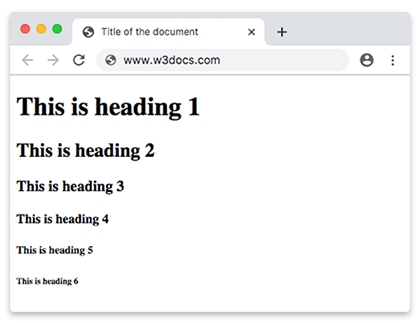
HTML has six "levels" of headings:
`` is used for main headings `` is used for subheadings
If there are further sections under the subheadings then the `` element is used, and so on...
* **PARAGRAPHS**
To create a paragraph, surround the words that make up the paragraph with an opening `
```

HTML has six "levels" of headings:
`` is used for main headings `` is used for subheadings
If there are further sections under the subheadings then the `` element is used, and so on...
* **PARAGRAPHS**
To create a paragraph, surround the words that make up the paragraph with an opening `
` is used for subheadings
If there are further sections under the subheadings then the `` element is used, and so on...
* **PARAGRAPHS**
To create a paragraph, surround the words that make up the paragraph with an opening `
` tag and closing `
` tag. * **BOLD & ITALIC** By enclosing words in the tags `` and `` we can make characters appear bold. By enclosing words in the tags `` and `` we can make characters appear italic. * **SUPERSCRIPT & SUBSCRIPT** The `` element is used to contain characters that should be superscript such as the suffixes of dates or mathematical concepts like raising a number to a power such as 22. The `` element is used to contain characters that should be subscript. It is commonly used with foot notes or chemical formulas such as H20. * **WHITE SPACE** When the browser comes across two or more spaces next to each other, it only displays one space. This is known as **white space collapsing**. * **LINE BREAKS** the browser will automatically show each new paragraph or heading on a new line. But if you wanted to add a line break inside the middle of a paragraph you can use the line break tag ``. And so much more you can check them here [text-formatting](https://www.w3schools.com/html/html_formatting.asp). * HTML elements are used to describe the structure of the page (e.g. headings, subheadings, paragraphs). * They also provide semantic information (e.g. where emphasis should be placed, the definition of any acronyms used, when given text is a quotation). ## JavaScript **BASIC JAVASCRIPT INSTRUCTIONS** * The language syntax and grammar: like any new language, there are new words to learn (the vocabulary) and rules for how these can be put together (the grammar and syntax of the language). * Giving instructions for a browser to follow. Web browsers (and computers in general) approach tasks in a very different way than a human might. Your instructions need to reflect how computers get things done. * STATEMENTS A script is a series of instructions that a computer can follow one-by-one. Each individual instruction or step is known as a statement. Statements should end with a semicolon. * STATEMENTS ARE INSTRUCTIONS AND EACH ONE STARTS ON A NEW LINE * STATEMENTS CAN BE ORGANIZED INTO CODE BLOCKS * COMMENTS You should write comments to explain what your code does. there are two types of comments: 1. multi-line comments:`/* */` 2. single-line comments:`//` * VARIABLE Is where you can store data. How to declare a variable: let variableName and you can assign a value to the variable using assignment operator. * DATA TYPES such as string, numbers, boolean ...etc  * ARRAYS An array is a special type of variable. It doesn't just store one value; it stores a list of values. You create an array and give it a name just like you would any other variable, The values are assigned to the array inside a pair of square brackets, and each value is separated by a comma. The values in the array do not need to be the same data type, so you can store a string, a number and a Boolean all in the same array. `colors = ["red",10,true]` * Expressions An expression evaluates into (results in) a single value. Broadly speaking there are two types of expressions. 1. expressions that just assign a value to a variable. 2. expressions that use two or more values to return a single value. * OPERATORS Expressions rely on things called operators; they allow programmers to create a single value from one or more values. ### DECISIONS & LOOPS * Conditional statements allow your code to make decisions about what to do next. * Comparison operators (===, !==, ==, !=, <, >, <=, =>) are used to compare two operands. * Logical operators allow you to combine more than one set of comparison operators. * if ... else statements allow you to run one set of code if a condition is true, and another if it is false. * switch statements allow you to compare a value against possible outcomes (and also provides a default option if none match). * Data types can be coerced from one type to another. All values evaluate to either truthy or falsy. * There are three types of loop: for, while, and do . . . while. Each repeats a set of statements.