class 3
LISTS IN HTML:
There are three different types of lists in html:
-
Ordered lists:
are lists where each item in the list is numbered.
The ordered list is created with the<ol>element. Each item in the list is placed between an opening<li>tag and a closing</li>tag. (The li stands for list item.) -
Unordered lists:
are lists that begin with a bullet point.
The unordered list is created with the<ul>element. Each item in the list is placed between an opening<li>tag and a closing</li>tag. (The li stands for list item.) -
Definition lists:
are made up of a set of terms along with the definitions for each of those terms.
The definition list is created with the<dl>element and usually consists of a series of terms and their definitions.Inside the<dl>element you will usually see pairs of<dt>and<dd>elements.<dt>This is used to contain the term being defined (the definition term).<dd>This is used to contain the definition. -
Nested lists:
You can put a second list inside an<li>element to create a sub- list or nested list.
BOXES
You can set several properties that affect the appearance of these boxes.
- Control the dimensions of your boxes
- Create borders around boxes
- Set margins and padding for boxes
- Show and hide boxes
Box dimensions
width , height
div.box {
  height: 300px;
  width: 300px;
  background-color: #bbbbaa;}
p{
height: 75%;
width: 75%; background-color: #0088dd;}
Every box has three available properties that can be adjusted to control its appearance:
- Border
- Margin
- Padding
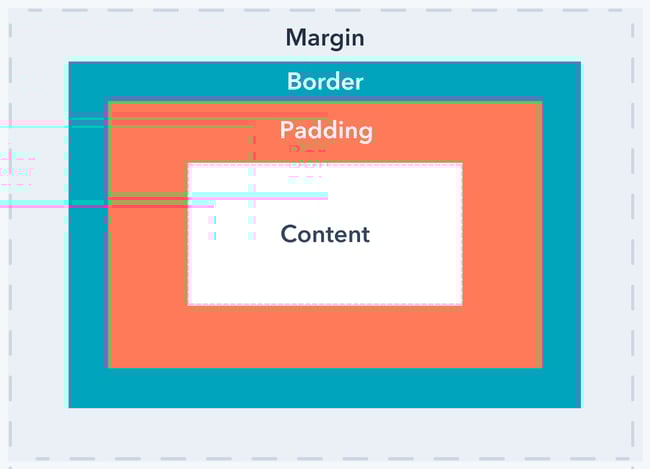
If you specify a width for a box, then the borders, margin, and padding are added to its width and height.
Hiding boxes
The visibility property allows you to hide boxes from users but It leaves a space where the element would have been.
html code
<ul>
<li>Home</li>
<li>Products</li>
<li class="coming-soon">Services</li> <li>About</li>
<li>Contact</li>
</ul>
css code
li {
  display: inline;
  margin-right: 10px;}
li.coming-soon {
  visibility: hidden;}
- CSS treats each HTML element as if it has its own box.
- You can use CSS to control the dimensions of a box.
- You can also control the borders, margin and padding for each box with CSS.
- It is possible to hide elements using the display and visibility properties.
- Block-level boxes can be made into inline boxes, and inline boxes made into block-level boxes.
- Legibility can be improved by controlling the width of boxes containing text and the leading.
Data types in js

- numeric data types
- string data types
- boolean data types
javaScript not like other languages you need to specify the data type to assign the value to a variable, based on the value it know the data type.
to know the data type of a variable you can use the typeOf() function. to assign a value to a value you use the assignment operators (=,+=,-=,*=,…etc).
ARRAYS
An array is a special type of variable. It doesn’t just store one value; it stores a list of values.
- creating an array :
var colors;
colors ['white', 'black', 'custom'];
or
var colors
new Array('white', 'black',
'custom ' ) ;
- changing value in an array:
To access a value from an array, after the array name you specify the index number for that value inside square brackets. You can change the value of an item an array by selecting it and assigning it a new value just as you would any other variable (using the equals sign and the new value for that item).
colors[2] = ‘red ‘ ;
if…else statements
The if…else statment checks a condition, if it resolves it to true it executes the first block of code if its false it executes the second block of code
if(condition){
    code...
}else{
    code...
}
switch statments
A switch statement starts with a variable called the switch value. Each case indicates a possible value for this variable and the code that should run if the variable matches that value.
switch(variable){
    case '1':
    code...
    break;
    case '2':
    code...
    break;
    .
    .
    .
    default:
    code...
    break;
}
loops
loops check if a condition is true it will still run and check again untill the condition is false, there are three types of loops :
- for loop:
for(var ;condition;increment){ code... } - while loop:
while(condition){ code... increment } - do while loop:
do{
 code...
 increment
}while(condition)