class 4
LINKS
Links are the defining feature of the web because they allow you to move from one web page to another.
- writing links
Links are created using the<a>element. Users can click on anything between the opening<a>tag and the closing</a>tag. You specify which page you want to link to using the href attribute.
<a href="the URL">the text you want to click on to take to the page</a>
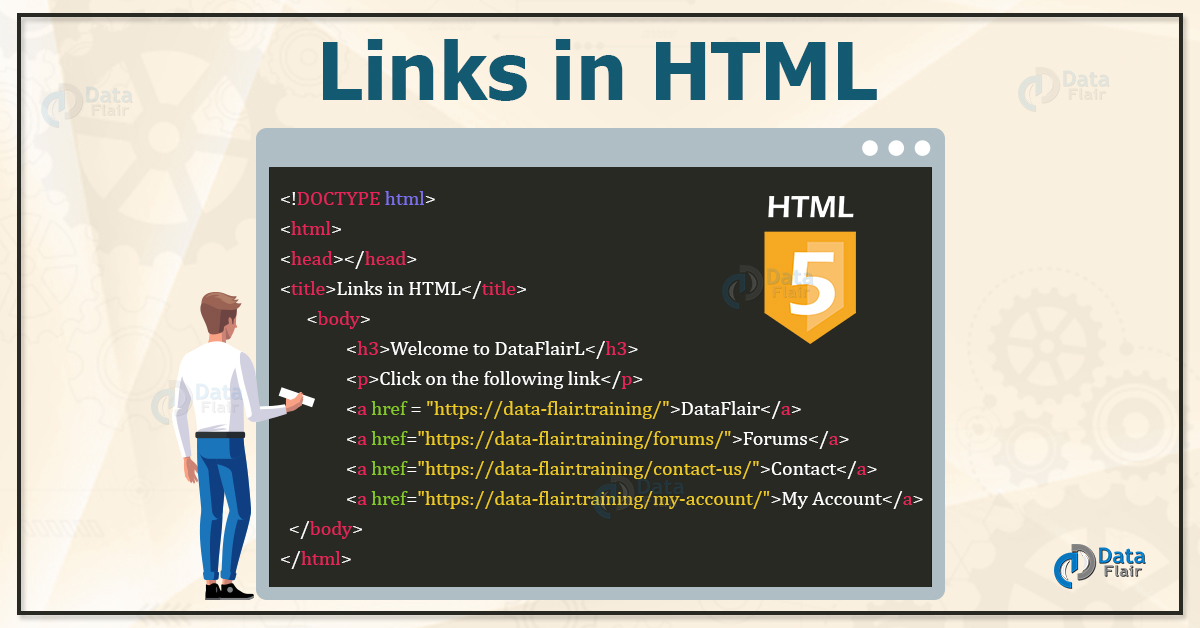
you can:
- link to other sites
- link to other pages on the same site, its is best to use relative URLs
- link emails
- open links in a new window
- link to a specific part of the smae page or another page
LAYOUTS
key concepts in positioning elements
-
Building Blocks: CSS treats each HTML element as if it is in its own box. This box will either be a block-level box or an inline box.
-
containing Elements: If one block-level element sits inside another block-level element then the outer box is known as the containing or parent element.
Controlling the position of elements
CSS has the following positioning schemes that allow you to control the layout of a page: normal flow, relative positioning, and absolute positioning. You specify the positioning scheme using the position property in CSS. You can also float elements using the float property. To indicate where a box should be positioned, you may also need to use box offset properties to tell the browser how far from the top or bottom and left or right it should be placed.
- normal flow
position:static - relative positiotning
position:relative - absolute positioning
position:absolute - fixed positioning
position:fixed -
floating elements
float
and much more.
screen sizes
Different visitors to your site will have different sized screens that show different amounts of information, so your design needs to be able to work on a range of different sized screens.
screen resolution
Resolution refers to the number of dots a screen shows per inch. Some devices have a higher resolution than desktop computers and most operating systems allow users to adjust the resolution of their screens.
page sizes
Because screen sizes and display resolutions vary so much, web designers often try to create pages of around 960-1000 pixels wide (since most users will be able to see designs this wide on their screens). <div>elements are often used as containing elements to group together sections of a page.- Browsers display pages in normal flow unless you specify relative, absolute, or fixed positioning.
- The float property moves content to the left or right of the page and can be used to create multi-column layouts. (Floated items require a defined width.)
- Pages can be fixed width or liquid (stretchy) layouts.
- Designers keep pages within 960-1000 pixels wide, and indicate what the site is about within the top 600 pixels (to demonstrate its relevance without scrolling).
- Grids help create professional and flexible designs. X CSS Frameworks provide rules for common tasks. X You can include multiple CSS files in one page.
FUNCTIONS METHODS & OBJECTS
- FUNCTIONS & METHODS:
Functions consist of a series of statements that have been grouped together because they perform a specific task. A method is the same as a function, except methods are created inside (and are part of) an object. - OBJECTS:
programmers use objects to create models of the world using data, and that objects are made up of properties and methods. In this section, you learn how to create your own objects using JavaScript - BUILT-IN OBJECTS:
The browser comes with a set of objects that act like a toolkit for creating interactive web pages. This section.
declaring a function:
function "name of the function"() {
    code...
    return ;
}
calling a function:
“name of the function”()
pair programming
Pair programming: is an agile software development technique in which two programmers work together at one workstation. One, the driver, writes code while the other, the observer or navigator, reviews each line of code as it is typed in. The two programmers switch roles frequently.
Why pair program?
there are four fundamental skills that help anyone learn a new language: Listening, Speaking, Reading, Writing.
Pair programming touches on all four skills: developers explain out loud what the code should do, listen to others’ guidance, read code that others have written, and write code themselves.
6 reasons for pair programming
- Greater efficiency
- Engaged collaboration
- Learning from fellow students
- Social skills
- Job interview readiness
- Work environment readiness